flutter, inside [flutter/lib/src]
Recently I developed a pure flutter application which related to AI virtual figure interaction. During the development process, I was impressed by the performance and flexibility of the Flutter framework. The plugins are mature and easy to use, and process is smooth (the overall core features are implemented within 2 months). This experience motivated me to explore the Flutter framework more deeply, especially the code under flutter/lib/src.
Directory Overview
The flutter/lib/src directory contains the core implementation of the Flutter framework. It includes various subdirectories and files that define widgets, rendering, animation, gestures, and other essential components of Flutter. Key subdirectories include:
widgets: Contains the implementation of Flutter’s widget system, including basic widgets likeContainer,Row,Column, and more complex widgets likeListViewandGridView.rendering: Contains the rendering engine of Flutter, which is responsible for drawing widgets on the screen.animation: Contains classes and functions related to animations in Flutter, includingAnimationController,Tween, and various animation widgets.gestures: Contains classes and functions for handling user input and gestures, such as taps, swipes, and drags.painting: Contains classes and functions for drawing graphics, text, and images on the screen.foundation: Contains foundational classes and utilities used throughout the Flutter framework, such asChangeNotifier,Key, andDiagnosticable.
Core Concepts
In the above directories, two of them are particularly interesting: widgets and rendering.
- The
widgetsdirectory defines the high-level building blocks of Flutter applications:- The widgets. Each widget is a class that extends the
Widgetbase class, which serves as the blueprint for creating UI components. - The elements. Widgets are either stateless or stateful. but both types will create an Element when they are inserted into the widget tree. The Element is responsible for managing the widget’s lifecycle and states in the widget tree.
- The widgets. Each widget is a class that extends the
- The
renderingdirectory defines the low-level rendering engine of Flutter:- The RenderObject. Each RenderObject is responsible for laying out and painting a portion of the UI. RenderObjects are organized in a tree structure, similar to widgets and elements.
- The layout and painting process. The rendering engine uses a two-pass layout and painting process to determine the size and position of each RenderObject and to draw them on the screen.
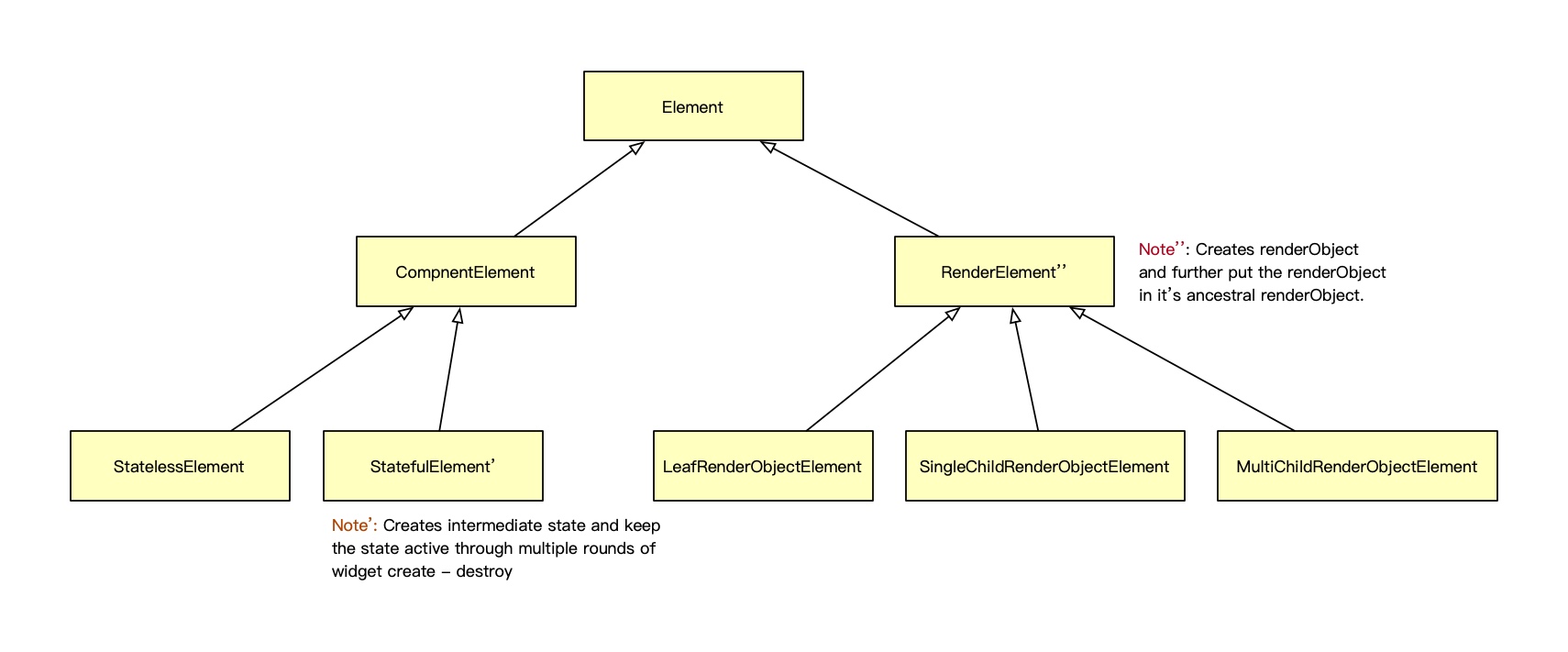
The element acts as a bridge between the widget and render object trees. When a widget is inserted into the widget tree, it creates an element that manages its lifecycle and state. The element then creates a corresponding render object that is responsible for laying out and painting the widget on the screen. All widgets have a corresponding element, depending on the type of widget, which creates either a stateless, stateful, or render object element.
- The
stateless elementis created by stateless widgets, which do not have mutable state. The stateless element is responsible for building the widget tree and managing the lifecycle of the widget. - The
stateful elementis created by stateful widgets, which have mutable state. The stateful element is responsible for managing the state of the widget and rebuilding the widget tree when the state changes. Typical examples of such widgets includeStatefulWidget,Checkbox, andTextField. - The
render object elementis created by widgets that have a corresponding render object. The render object element is responsible for creating and managing the render object and updating it when the widget’s properties change. Typical examples of such widgets includeContainer,Text, andImage.
Initialization Process
When a Flutter application starts, the following steps occur:
- The
main()function is called, which typically callsrunApp()with the root widget of the application. - The
runApp()function creates aWidgetsFlutterBindinginstance, which initializes the Flutter framework and sets up the necessary bindings between the framework and the underlying platform. - A
RenderViewis created, which serves as the root of the render object tree. TheRenderViewis responsible for managing the layout and painting of the entire application. - The root widget is inserted into the widget tree, which creates the corresponding element and render object. More specifically, the
_rebuildandinflateWidgetmethod is called from the root element, which recursively builds the widget tree and creates the corresponding elements and render objects. - The layout and painting process is initiated, which determines the size and position of each render object and draws them on the screen. (The layout and painting process will be further discussed in the later sections.)
The whole process can be further summarized as the chart below
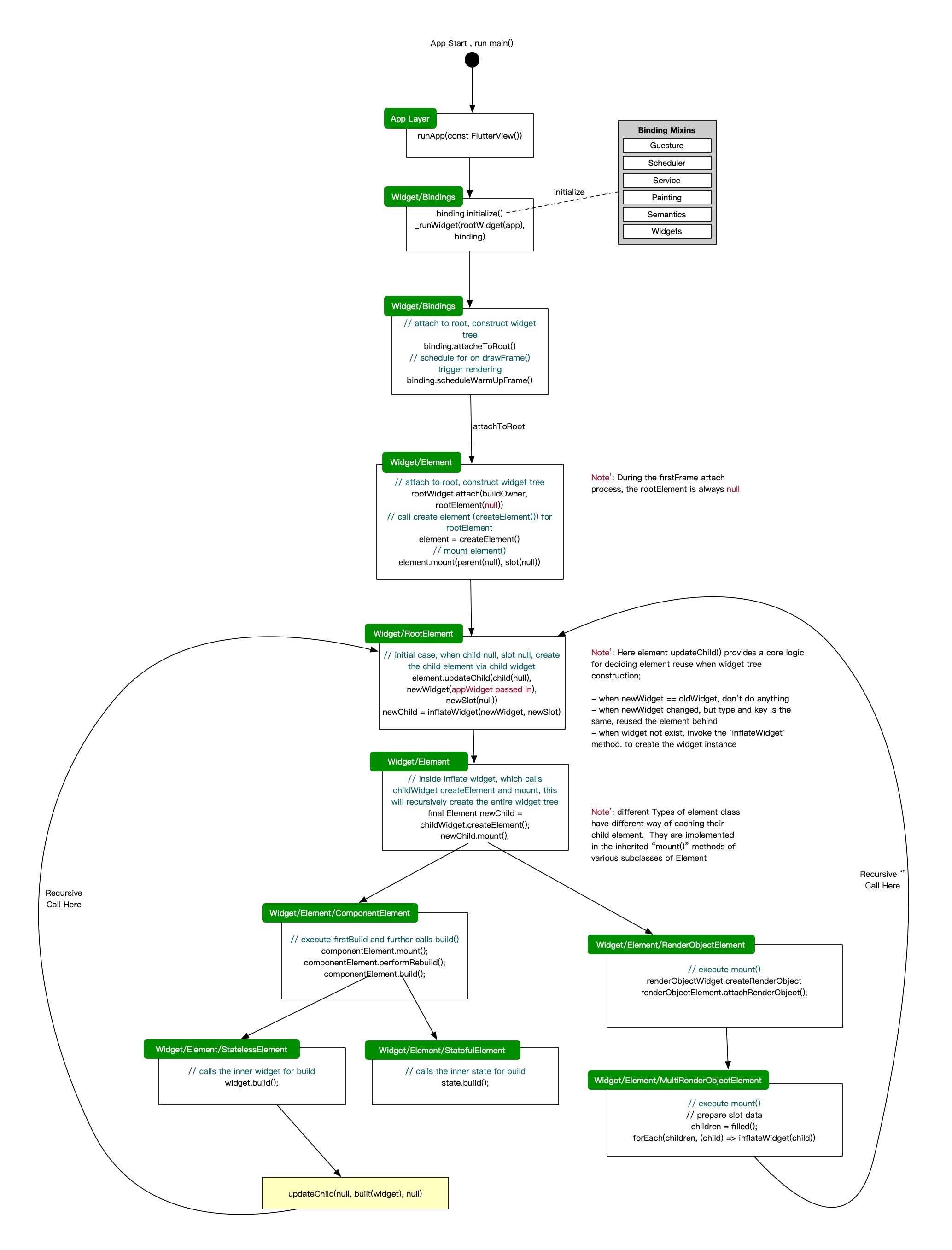
Notably, based on the Framework.dart, the initialization process for ComponentElement and RenderObjectElement is slightly different. Both of the two types if the elements start with the common updateChild method in the base Element class:
  Element? updateChild(Element? child, Widget? newWidget, Object? newSlot) {
    if (newWidget == null) {
      if (child != null) {
        deactivateChild(child);
      }
      return null;
    }

    final Element newChild;
    if (child != null) {
      bool hasSameSuperclass = true;
      assert(() {
        final int oldElementClass = Element._debugConcreteSubtype(child);
        final int newWidgetClass = Widget._debugConcreteSubtype(newWidget);
        hasSameSuperclass = oldElementClass == newWidgetClass;
        return true;
      }());
      if (hasSameSuperclass && child.widget == newWidget) {
        // ... ignore the lengthy element reusing logic here,
        // https://github.com/flutter/flutter/blob/master/packages/flutter/lib/src/widgets/framework.dart#L3982
      } else {
        deactivateChild(child);
        assert(child._parent == null);
        // The [debugProfileBuildsEnabled] code for this branch is inside
        // [inflateWidget], since some [Element]s call [inflateWidget] directly
        // instead of going through [updateChild].
        newChild = inflateWidget(newWidget, newSlot);
      }
    } else {
      // The [debugProfileBuildsEnabled] code for this branch is inside
      // [inflateWidget], since some [Element]s call [inflateWidget] directly
      // instead of going through [updateChild].
      newChild = inflateWidget(newWidget, newSlot);
    }

    assert(() {
      if (child != null) {
        _debugRemoveGlobalKeyReservation(child);
      }
      final Key? key = newWidget.key;
      if (key is GlobalKey) {
        assert(owner != null);
        owner!._debugReserveGlobalKeyFor(this, newChild, key);
      }
      return true;
    }());

    return newChild;
  }
For initial builds, which will call the inflateWidget method to create a new element based on the type of the widget, here the behavior diverges for different types of elements on the createElement and mount
  Element inflateWidget(Widget newWidget, Object? newSlot) {
    try {
      // ... Timeline tracking code omitted for brevity ...
      final Element newChild = newWidget.createElement();   <<<<<<<<
      assert(() {
        _debugCheckForCycles(newChild);
        return true;
      }());
      newChild.mount(this, newSlot);                        <<<<<<<<
      assert(newChild._lifecycleState == _ElementLifecycle.active);
      return newChild;
    } finally {
      if (isTimelineTracked) {
        FlutterTimeline.finishSync();
      }
    }
  }
- For ComponentElement, the
mountmethod is called to insert the element into the widget tree, which then calls theinflateWidgetmethod to build the widget tree and create the corresponding elements and render objects.
abstract class ComponentElement extends Element {

  @override
  void mount(Element? parent, Object? newSlot) {
    super.mount(parent, newSlot);
    assert(_child == null);
    assert(_lifecycleState == _ElementLifecycle.active);
    _firstBuild();                   <<<< which eventually calls build();
    assert(_child != null);
  }

  @override
  @pragma('vm:notify-debugger-on-exception')
  void performRebuild() {
    Widget? built;
    try {
      // ...
      built = build();               <<<< build() is called here
    } catch (e, stack) {
      // ...
    } finally {
      // We delay marking the element as clean until after calling build() so
      // that attempts to markNeedsBuild() during build() will be ignored.
      super.performRebuild(); // clears the "dirty" flag
    }
    try {
      _child = updateChild(_child, built, slot);   <<<< recursive call to `updateChild`
      assert(_child != null);
    } catch (e, stack) {
      // ...
    }
  }
}
- For RenderObjectElement, the
mountmethod is also called to insert the element into the widget tree, but it directly creates the render object and attaches it to the parent render object.
abstract class RenderObjectElement extends Element {
  @override
  void mount(Element? parent, Object? newSlot) {
    super.mount(parent, newSlot);
    assert(() {
      _debugDoingBuild = true;
      return true;
    }());
    _renderObject = (widget as RenderObjectWidget).createRenderObject(this);   <<<<<< 创建render object
    assert(!_renderObject!.debugDisposed!);
    assert(() {
      _debugDoingBuild = false;
      return true;
    }());
    assert(() {
      _debugUpdateRenderObjectOwner();
      return true;
    }());
    assert(slot == newSlot);
    attachRenderObject(newSlot);    <<<<<< attach to parent render object, 构建render object tree
    super.performRebuild(); // clears the "dirty" flag
  }
}

class MultiChildRenderObjectElement extends Element {
  @override
  void mount(Element? parent, Object? newSlot) {
    super.mount(parent, newSlot);
    final MultiChildRenderObjectWidget multiChildRenderObjectWidget =
        widget as MultiChildRenderObjectWidget;

    // <<<<<<<< create children elements for each child widget
    final List<Element> children = List<Element>.filled(
      multiChildRenderObjectWidget.children.length,
      _NullElement.instance,
    );
    Element? previousChild;

    // iterate through each child widget to create corresponding element,inflateWidget is called here
    for (int i = 0; i < children.length; i += 1) {
      final Element newChild = inflateWidget(
        multiChildRenderObjectWidget.children[i],
        IndexedSlot<Element?>(i, previousChild),
      );
      children[i] = newChild;
      previousChild = newChild;
    }
    _children = children;
  }
}
Several Types Of Trees in Flutter
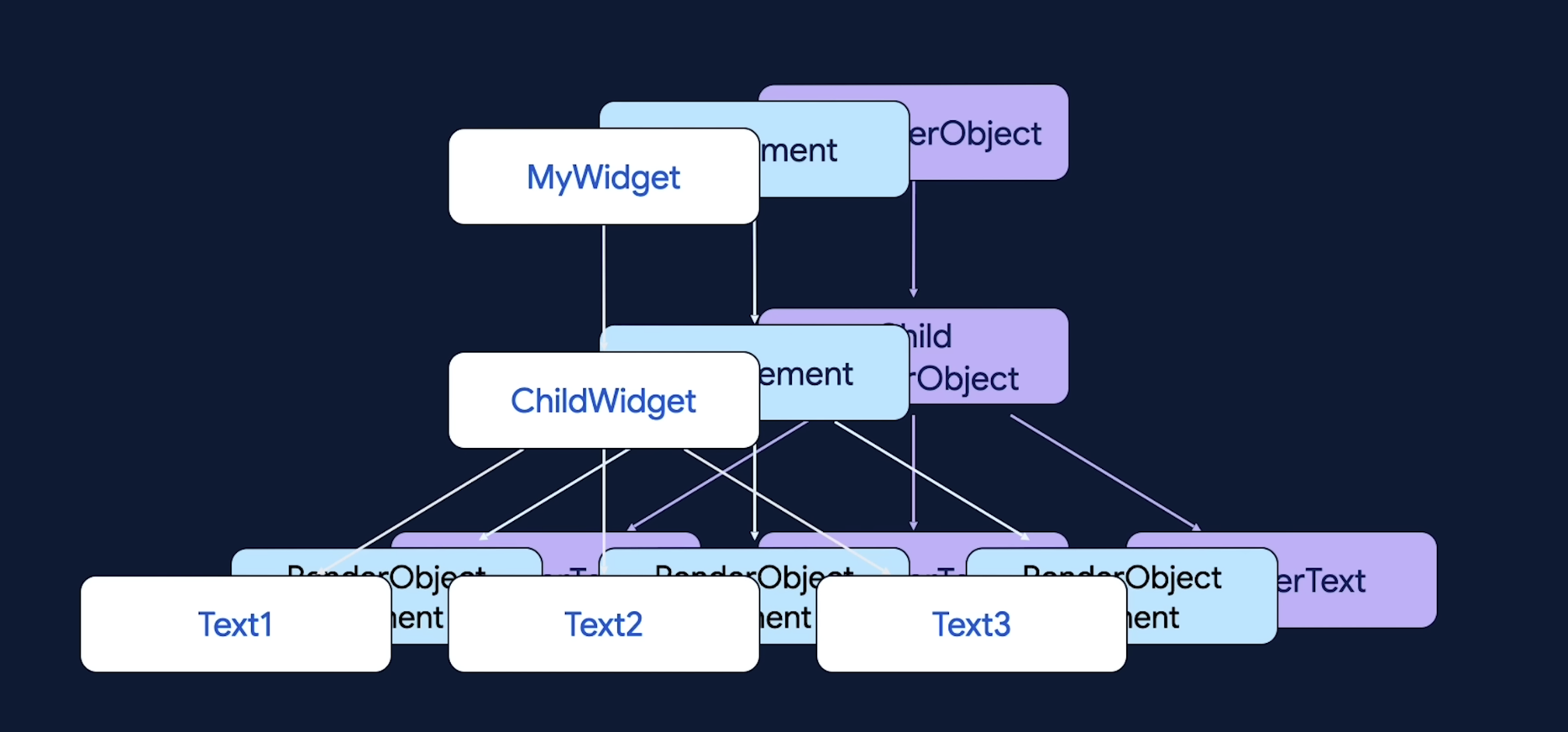
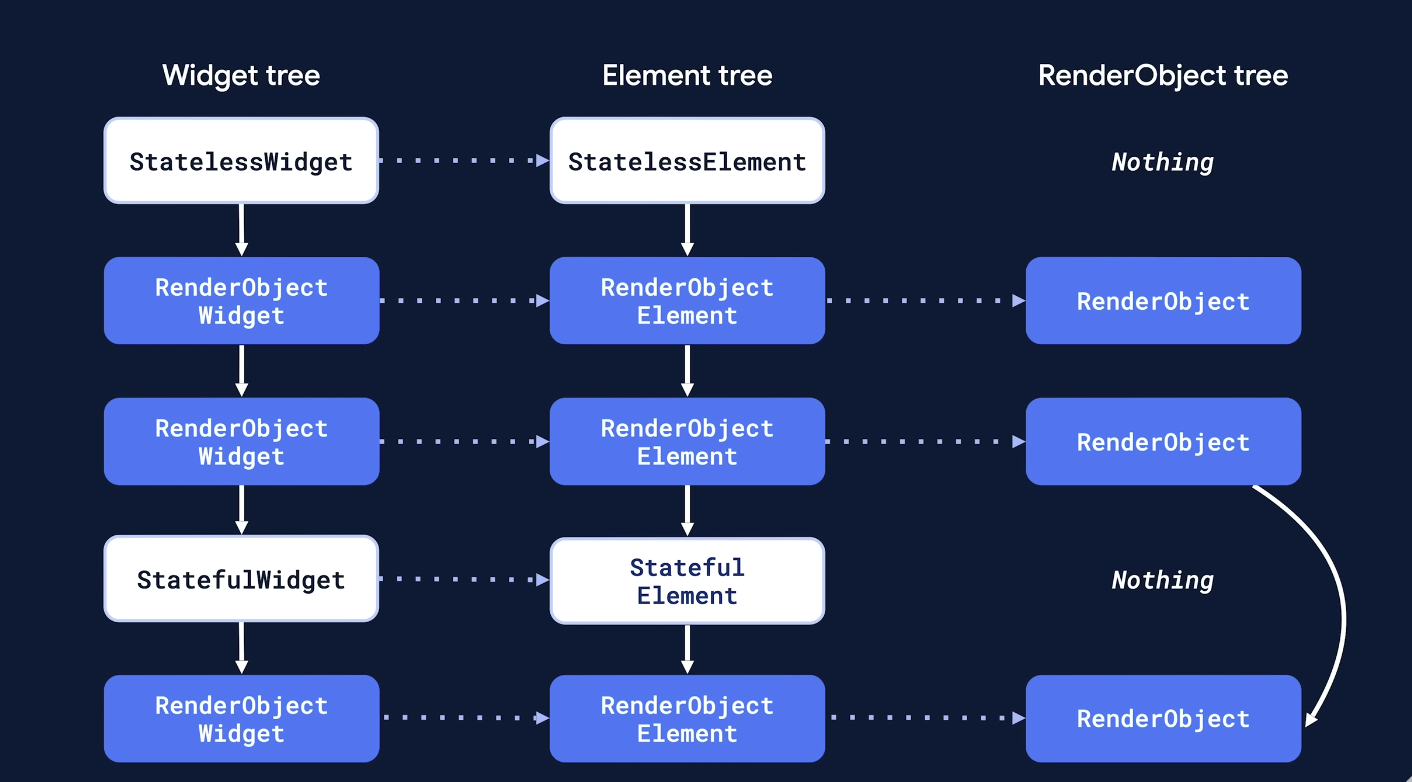
So far based on the above code we have walked through the initialization process of a Flutter application, and we can summarize that there are several types of trees in the Flutter framework:
- The Widget Tree: This tree represents the hierarchical structure of widgets in a Flutter application. Each widget is a node in the tree, and the tree is built using the
build()method of widgets. - The Element Tree: This tree represents the hierarchical structure of elements in a Flutter application. Each element corresponds to a widget in the widget tree and manages its lifecycle and state.
- The Render Object Tree: This tree represents the hierarchical structure of render objects in a Flutter application. Each render object corresponds to an element in the element tree and is responsible for laying out and painting the widget on the screen.
The RenderObject
In the above three trees, the render object tree is the lowest level tree, which is responsible for the actual rendering of the UI (layout/paint) as well as hitTesting. It is kept as long as possible to avoid unnecessary rebuilds. Once the renderObject is created, it is attached to the renderObject tree:
abstract class RenderObjectElement extends Element {

  @override
  void mount(Element? parent, Object? newSlot) {
    super.mount(parent, newSlot);
    // ...
    _renderObject = (widget as RenderObjectWidget).createRenderObject(this);
    // ...
    attachRenderObject(newSlot);
    super.performRebuild(); // clears the "dirty" flag
  }


  @override
  void attachRenderObject(Object? newSlot) {
    /// insert renderObject to its ancestor renderObject
    _ancestorRenderObjectElement?.insertRenderObjectChild(renderObject, newSlot);

    /// retrieve the "ParentDataElements" which provides parentData information such as alignment, flex, etc.
    /// and further apply the parentData to the renderObject, which will be used during layout phase.
    final List<ParentDataElement<ParentData>> parentDataElements =
        _findAncestorParentDataElements();
    for (final ParentDataElement<ParentData> parentDataElement in parentDataElements) {
      _updateParentData(parentDataElement.widget as ParentDataWidget<ParentData>);
    }
  }
}
The RenderObject class does not define how the child is retained, instead its subclasses define how to manage their children. It also does not declare implementations for inserting, removing, or moving children; instead, these behaviors are provided by mixins that are applied to specific render object subclasses.
For example, the ContainerRenderObjectMixin mixin provides default implementations for managing children in render boxes that have multiple children.
class MultiChildRenderObjectElement extends RenderObjectElement {
  @override
  void insertRenderObjectChild(RenderObject child, IndexedSlot<Element?> slot) {
    final ContainerRenderObjectMixin<RenderObject, ContainerParentDataMixin<RenderObject>>
    renderObject = this.renderObject;
    assert(renderObject.debugValidateChild(child));
    renderObject.insert(child, after: slot.value?.renderObject);
    assert(renderObject == this.renderObject);
  }
}

mixin ContainerRenderObjectMixin<
  ChildType extends RenderObject,
  ParentDataType extends ContainerParentDataMixin<ChildType>
> {
 void insert(ChildType child, {ChildType? after}) {
    // ...
    _insertIntoChildList(child, after: after);
  }
}
Similarly, the RenderObject class does not define coordination system, instead its subclass RenderBox defines a 2D coordinate system for layout and painting. Most of the time, the RenderBox is treated as the base class for custom render objects in Flutter. Since it is a very important class in the entire flutter framework, it is good to to go through part of its declaration here:
parentDatarelated, thesetupParentDatamust be called before the_updateParentDataof theRenderObjectElementto ensure that the parent data is correctly set up for the child render object.
  /// Data for use by the parent render object.
  ///
  /// The parent data is used by the render object that lays out this object
  /// (typically this object's parent in the render tree) to store information
  /// relevant to itself and to any other nodes who happen to know exactly what
  /// the data means. The parent data is opaque to the child.
  ///
  ///  * The parent data field must not be directly set, except by calling
  ///    [setupParentData] on the parent node.
  ///  * The parent data can be set before the child is added to the parent, by
  ///    calling [setupParentData] on the future parent node.
  ///  * The conventions for using the parent data depend on the layout protocol
  ///    used between the parent and child. For example, in box layout, the
  ///    parent data is completely opaque but in sector layout the child is
  ///    permitted to read some fields of the parent data.
  ParentData? parentData;

  /// Override to setup parent data correctly for your children.
  ///
  /// You can call this function to set up the parent data for child before the
  /// child is added to the parent's child list.
  void setupParentData(covariant RenderObject child);
- child management related,
  void adoptChild(RenderObject child);
  void dropChild(RenderObject child);
  void visitChildren(RenderObjectVisitor visitor);
which further is further overridden by subclasses/mixins such as ContainerRenderObjectMixin to provide concrete implementations for managing multiple children.
  /// Adds the given child to the end of the child list.
  ///
  /// The child's [parentData] must have been set up correctly beforehand by
  /// calling [setupParentData].
  void add(RenderBox child) {
    insert(child, after: _lastChild);
  }

  /// Removes the given child from the child list.
  void remove(RenderBox child) {
    final BoxParentData childParentData = child.parentData! as BoxParentData;
    assert(childParentData.previousSibling != null || childParentData.nextSibling != null || _firstChild == child);
    _removeFromChildList(child);
    childParentData.previousSibling = null;
    childParentData.nextSibling = null;
  }
- pipelineOwner, which manages the rendering pipeline, including layout, painting, and compositing.
  /// The pipeline owner for this render box.
  ///
  /// The pipeline owner manages the rendering pipeline, including layout,
  /// painting, and compositing.
  PipelineOwner get owner => _owner!;
  PipelineOwner? _owner;

  /// Mark this render object as attached to the given owner.
  ///
  /// Typically called only from the [parent]'s [attach] method, and by the
  /// [owner] to mark the root of a tree as attached.
  ///
  /// Subclasses with children should override this method to
  /// [attach] all their children to the same [owner]
  /// after calling the inherited method, as in `super.attach(owner)`.
  void attach(PipelineOwner owner);

  /// Mark this render object as detached from its [PipelineOwner].
  ///
  /// Typically called only from the [parent]'s [detach], and by the [owner] to
  /// mark the root of a tree as detached.
  ///
  /// Subclasses with children should override this method to
  /// [detach] all their children after calling the inherited method,
  /// as in `super.detach()`.
  void detach();
- layout and constraints, the
constraintis set during layout(), called by the parent render object.
 Constraints? _constraints;


  /// Whether this [RenderObject] is a known relayout boundary.
  ///
  /// A relayout boundary is a [RenderObject] whose parent does not rely on the
  /// child [RenderObject]'s size in its own layout algorithm. In other words,
  /// if a [RenderObject]'s [performLayout] implementation does not ask the child
  /// for its size at all, **the child** is a relayout boundary.
  ///
  /// which affects how layout invalidation is propagated through the render tree.
  bool? _isRelayoutBoundary;


  /// Mark this render object's layout information as dirty, and either register
  /// this object with its [PipelineOwner], or defer to the parent, depending on
  /// whether this object is a relayout boundary or not respectively.
  ///
  void markNeedsLayout();
- layer related
  /// Whether this render object repaints separately from its parent.
  ///
  /// Override this in subclasses to indicate that instances of your class ought
  /// to repaint independently. For example, render objects that repaint
  /// frequently might want to repaint themselves without requiring their parent
  /// to repaint.
  ///
  /// See [RepaintBoundary] for more information about how repaint boundaries function.
  bool get isRepaintBoundary => false;

  final LayerHandle<ContainerLayer> _layerHandle = LayerHandle<ContainerLayer>();

  /// Mark this render object as having changed its visual appearance.
  ///
  /// See also:
  ///
  ///  * [RepaintBoundary], to scope a subtree of render objects to their own
  ///    layer, thus limiting the number of nodes that [markNeedsPaint] must mark
  ///    dirty.
  void markNeedsPaint()

  /// Paint this render object into the given context at the given offset.
  ///
  /// Subclasses should override this method to provide a visual appearance
  /// for themselves. The render object's local coordinate system is
  /// axis-aligned with the coordinate system of the context's canvas and the
  /// render object's local origin (i.e, x=0 and y=0) is placed at the given
  /// offset in the context's canvas.
  ///
  /// Do not call this function directly. If you wish to paint yourself, call
  /// [markNeedsPaint] instead to schedule a call to this function. If you wish
  /// to paint one of your children, call [PaintingContext.paintChild] on the
  /// given `context`.
  ///
  /// When painting one of your children (via a paint child function on the
  /// given context), the current canvas held by the context might change
  /// because draw operations before and after painting children might need to
  /// be recorded on separate compositing layers.
  void paint(PaintingContext context, Offset offset);

  /// An estimate of the bounds within which this render object will paint.
  /// Useful for debugging flags such as [debugPaintLayerBordersEnabled].
  ///
  /// These are also the bounds used by [showOnScreen] to make a [RenderObject]
  /// visible on screen.
  Rect get paintBounds;
- lastly, hit testing related, regarding the
hitTest, it will be discussed in another article.
  /// Override this method to implement hit testing for your render object.
  ///
  /// The default implementation does nothing and returns false.
  ///
  /// The given position is in the local coordinate system of this render
  /// object (i.e. with the origin at the top left of this render object).
  ///
  /// If this render object hits at the given position, it should add itself
  /// to the given [HitTestResult], and then typically it should also
  /// hit test its children by calling their [hitTest] methods.
  ///
  /// Returns true if the hit test was successful (i.e. if this render object
  /// or one of its descendants added itself to the [HitTestResult]).
  bool hitTest(HitTestResult result, {required Offset position});
The Update Of Trees
Similar to the initialization process, when a widget needs to be updated (for example, when the state of a stateful widget changes), the following steps occur:
- The
setState()method is called on the stateful widget, which marks the widget as dirty and schedules a rebuild. - The framework calls the
performRebuild()method on the corresponding element, which calls the build()method to rebuild the widget tree.
Here the element tree / render object tree update process is similar to the initialization process. When the platformDispatcher.onDrawFrame event is triggered, the _handlePersistentFrameCallback cached in the persistentFrameCallbacks set of the WidgetsBinding is called, which eventually calls the flushBuild() method to rebuild the widget tree.
  void _handlePersistentFrameCallback(Duration timeStamp) {
    drawFrame();
    _scheduleMouseTrackerUpdate();
  }
Inside the drawFrame(); the layout/layering/painting process will be further triggered. we will talk about it in the next section. The take away from this section is that the construction of Widget/Element/RenderObject trees and the layout/layering/painting process are two separate processes in the Flutter framework. The former is responsible for defining the structure and behavior of the UI, while the latter is responsible for rendering the UI on the screen, which is closely tied to different platform’s rendering pipelines.
Tasks Happening Each Frame
All tasks are executed by the scheduler, in the concept of a frame. In each frame, several phases are defined and tasks are performed in specific phases to ensure that the UI is updated and rendered correctly. These tasks are summarized in the chart below:
Timeline:
|-------- handleBeginFrame --------|-------- handleDrawFrame --------|
| # 1. in beginFrame()               # 3. in drawFrame()
| Transient Callbacks              | Persistent Callbacks
| - Ticker callbacks               | - WidgetsBinding.drawFrame
| - AnimationController updates    |   - buildScope.flushBuild
| - Custom frame callbacks         |   - pipelineOwner.flushLayout
|                                  |   - pipelineOwner.flushPaint
| # 2. via dart vm, between beginFrame and drawFrame
| MidFrame Microtasks              | # 4. also in drawFrame()
| - Futures resolved               |Post Frame Callbacks
| - setState from animations       | - Cleanup
|                                  | - Schedule next frame
In the source code of scheduler.dart, we can see that the SchedulerPhase enum defines the different phases of a frame:
enum SchedulerPhase {
  /// No frame is being processed. Tasks (scheduled by
  /// [SchedulerBinding.scheduleTask]), microtasks (scheduled by
  /// [scheduleMicrotask]), [Timer] callbacks, event handlers (e.g. from user
  /// input), and other callbacks (e.g. from [Future]s, [Stream]s, and the like)
  /// may be executing.
  idle,

  /// The transient callbacks (scheduled by
  /// [SchedulerBinding.scheduleFrameCallback]) are currently executing.
  ///
  /// Typically, these callbacks handle updating objects to new animation
  /// states.
  ///
  /// See [SchedulerBinding.handleBeginFrame].
  transientCallbacks,

  /// Microtasks scheduled during the processing of transient callbacks are
  /// current executing.
  ///
  /// This may include, for instance, callbacks from futures resolved during the
  /// [transientCallbacks] phase.
  midFrameMicrotasks,

  /// The persistent callbacks (scheduled by
  /// [SchedulerBinding.addPersistentFrameCallback]) are currently executing.
  ///
  /// Typically, this is the build/layout/paint pipeline. See
  /// [WidgetsBinding.drawFrame] and [SchedulerBinding.handleDrawFrame].
  persistentCallbacks,

  /// The post-frame callbacks (scheduled by
  /// [SchedulerBinding.addPostFrameCallback]) are currently executing.
  ///
  /// Typically, these callbacks handle cleanup and scheduling of work for the
  /// next frame.
  ///
  /// See [SchedulerBinding.handleDrawFrame].
  postFrameCallbacks,
}
The Rendering Process
Let’s continue to explore the rendering process, which is related to two frame methods bind to platformDispatcher:
mixin SchedulerBinding on BindingBase {
  @protected
  void ensureFrameCallbacksRegistered() {
    platformDispatcher.onBeginFrame ??= _handleBeginFrame;
    platformDispatcher.onDrawFrame ??= _handleDrawFrame;
  }
}
The _handleBeginFrame is mainly responsible for updating animations (transient frame callbacks), e.g. the _tick in animationController:
// Ticker 注册瞬态回调
class Ticker {
  void scheduleTick({bool rescheduling = false}) {
    _animationId = SchedulerBinding.instance.scheduleFrameCallback(
      _tick,  // ← 这个回调在 handleBeginFrame 中执行
      rescheduling: rescheduling,
    );
  }

  void _tick(Duration elapsed) {
    // 更新动画值
    _onTick?.call(elapsed);
    // 继续下一帧
    scheduleTick(rescheduling: true);
  }
}

// AnimationController 使用 Ticker
class AnimationController {
  void _tick(Duration elapsed) {
    // 计算动画进度
    _value = lerpDouble(_lowerBound, _upperBound, progress);
    // 通知监听器
    notifyListeners();
  }
}
The _handleDrawFrame is responsible for the main rendering process, which eventually calls the drawFrame() method of WidgetsBinding to perform the build/layout/paint pipeline. This is where the focus of the rest of this section lies.
mixin RendererBinding on SchedulerBinding {
  @protected
  void drawFrame() {
    rootPipelineOwner.flushLayout();
    rootPipelineOwner.flushCompositingBits();
    rootPipelineOwner.flushPaint();
    if (sendFramesToEngine) {
      for (final RenderView renderView in renderViews) {
        renderView.compositeFrame(); // this sends the bits to the GPU
      }
      rootPipelineOwner.flushSemantics(); // this sends the semantics to the OS.
      _firstFrameSent = true;
    }
  }
}
Flush Layout
Now let’s look at the rootPipelineOwner’s flushLayout, flushCompositingBits, and flushPaint methods; flushLayout first:
base class PipelineOwner with DiagnosticableTreeMixin {
  // ... other members omitted for brevity ...
  void flushLayout() {
    try {
      while (_nodesNeedingLayout.isNotEmpty) {
        final List<RenderObject> dirtyNodes = _nodesNeedingLayout;                  <<<< get dirty nodes
        _nodesNeedingLayout = <RenderObject>[];
        dirtyNodes.sort((RenderObject a, RenderObject b) => a.depth - b.depth);     <<<< sort by depth
        for (int i = 0; i < dirtyNodes.length; i++) {
          if (_shouldMergeDirtyNodes) {
            _shouldMergeDirtyNodes = false;
            if (_nodesNeedingLayout.isNotEmpty) {
              _nodesNeedingLayout.addAll(dirtyNodes.getRange(i, dirtyNodes.length));
              break;
            }
          }
          final RenderObject node = dirtyNodes[i];
          if (node._needsLayout && node.owner == this) {
            node._layoutWithoutResize();                                            <<<< perform layout
          }
        }
        _shouldMergeDirtyNodes = false;
      }
      for (final PipelineOwner child in _children) {
        child.flushLayout();
      }
    } finally {
      _shouldMergeDirtyNodes = false;
      if (!kReleaseMode) {
        FlutterTimeline.finishSync();
      }
    }
  }
}
The _layoutWithoutResize method of the RenderObject is called to perform the actual layout process, we can see the performLayout method is called and right after it, the node is also markNeedsPaint().
abstract class RenderObject extends DiagnosticableTree {
  void _layoutWithoutResize() {
    try {
      performLayout();
      markNeedsSemanticsUpdate();
    } catch (e, stack) {
      _reportException('performLayout', e, stack);
    }
    _needsLayout = false;
    markNeedsPaint();
  }

  void layout(Constraints constraints, {bool parentUsesSize = false}) {
    _isRelayoutBoundary = !parentUsesSize || sizedByParent || constraints.isTight || parent == null;
    if (!_needsLayout && constraints == _constraints) {
      if (!kReleaseMode && debugProfileLayoutsEnabled) {
        FlutterTimeline.finishSync();
      }
      return;
    }
    _constraints = constraints;
    if (sizedByParent) {
      try {
        performResize();
      } catch (e, stack) {
        _reportException('performResize', e, stack);
      }
    }
    RenderObject? debugPreviousActiveLayout;
    try {
      performLayout();
      markNeedsSemanticsUpdate();
    } catch (e, stack) {
      _reportException('performLayout', e, stack);
    }
    _needsLayout = false;
    markNeedsPaint();
    if (!kReleaseMode && debugProfileLayoutsEnabled) {
      FlutterTimeline.finishSync();
    }
  }
}
In the performLayout() method, the render object calculates its size and position based on its constraints and the sizes of its children. Subclasses of RenderObject must override this method to implement their specific layout logic. Let’s take the AppBarTitleBox as an example:
class _RenderAppBarTitleBox extends RenderBox {
  @override
  void performLayout() {
    /// create of innerConstraints with infinite maxHeight
    final BoxConstraints innerConstraints = constraints.copyWith(maxHeight: double.infinity);
    /// invoke child layout method
    child!.layout(innerConstraints, parentUsesSize: true);
    /// get the size from the child
    size = constraints.constrain(child!.size);
    alignChild();
  }
}
Which is just as the well heard saying in flutter: “Constraints go down, sizes go up, parents set positions”. Now, let’s continue to dive further into the layout() method of child render object:
abstract class RenderObject extends DiagnosticableTree {
  void layout(Constraints constraints, {bool parentUsesSize = false}) {

    /// critical evaluation of _isRelayoutBoundary, for further optimization of layout invalidation propagation
    _isRelayoutBoundary = !parentUsesSize || sizedByParent || constraints.isTight || parent == null;
    if (!_needsLayout && constraints == _constraints) {
      if (!kReleaseMode && debugProfileLayoutsEnabled) {
        FlutterTimeline.finishSync();
      }
      return;
    }
    _constraints = constraints;
    if (sizedByParent) {
      try {
        performResize();
      } catch (e, stack) {
        _reportException('performResize', e, stack);
      }
    }
    RenderObject? debugPreviousActiveLayout;
    try {
      performLayout();
      markNeedsSemanticsUpdate();
    } catch (e, stack) {
      _reportException('performLayout', e, stack);
    }
    _needsLayout = false;
    markNeedsPaint();
    if (!kReleaseMode && debugProfileLayoutsEnabled) {
      FlutterTimeline.finishSync();
    }
  }
}
- The
_isRelayoutBoundaryis determined based on whether the parent uses the size of the child in its layout algorithm. And notably, it is generated at the layout time, which means it can only be generated first and then used in the next time callingmarkNeedsLayout()for further skippingmarkParentNeedsLayout(); - If the
sizedByParentis set to true, theperformResize()method is called to determine the size of the render object based on its constraints. Instead ofperformLayout(), which is responsible for positioning the children within the render object.
Flush Composite Bits
During the adopt/drop child phase of the render object tree construction/update or the synthetic property changes of render object, the markNeedsCompositingBitsUpdate() is called to mark the render object as needing a compositing bits update. This is important because compositing bits determine how the render object is composited onto the screen, which can affect performance and visual quality. Which add the render object to the _nodesNeedingCompositingBitsUpdate set of the PipelineOwner.
  /// Mark this render object as needing its compositing bits updated.
  ///
  /// This method adds this render object to the list of nodes that will have
  /// their compositing bits updated during the next call to
  /// [PipelineOwner.flushCompositingBits].
  void markNeedsCompositingBitsUpdate() {
    if (_needsCompositingBitsUpdate) {
      return;
    }
    _needsCompositingBitsUpdate = true;
    owner._nodesNeedingCompositingBitsUpdate.add(this);
  }
Then during the drawFrame() method, the flushCompositingBits() is called to update the compositing bits of all render objects that need it. It will be further used in the flushPaint phase to determine whether a render object needs to be painted onto a separate compositing layer.
  void flushCompositingBits() {
    try {
      while (_nodesNeedingCompositingBitsUpdate.isNotEmpty) {
        final List<RenderObject> dirtyNodes = _nodesNeedingCompositingBitsUpdate;
        _nodesNeedingCompositingBitsUpdate = <RenderObject>[];
        dirtyNodes.sort((RenderObject a, RenderObject b) => b.depth - a.depth);
        for (final RenderObject node in dirtyNodes) {
          node._updateCompositingBits();
        }
      }
      for (final PipelineOwner child in _children) {
        child.flushCompositingBits();
      }
    } finally {
      if (!kReleaseMode) {
        FlutterTimeline.finishSync();
      }
    }
  }

  late bool _needsCompositing; // initialized in the constructor
  /// Whether we or one of our descendants has a compositing layer.
  ///
  /// If this node needs compositing as indicated by this bit, then all ancestor
  /// nodes will also need compositing.
  ///
  /// Only legal to call after [PipelineOwner.flushLayout] and
  /// [PipelineOwner.flushCompositingBits] have been called.
  bool get needsCompositing {
    assert(!_needsCompositingBitsUpdate); // make sure we don't use this bit when it is dirty
    return _needsCompositing;
  }

  void _updateCompositingBits() {
    if (!_needsCompositingBitsUpdate) {
      return;
    }
    final bool oldNeedsCompositing = _needsCompositing;
    _needsCompositing = false;
    visitChildren((RenderObject child) {
      child._updateCompositingBits();
      if (child.needsCompositing) {
        _needsCompositing = true;
      }
    });

    /// isRepaintBoundary will decide whether this render object needs its own compositing layer
    if (isRepaintBoundary || alwaysNeedsCompositing) {
      _needsCompositing = true;
    }
    // If a node was previously a repaint boundary, but no longer is one, then
    // regardless of its compositing state we need to find a new parent to
    // paint from. To do this, we mark it clean again so that the traversal
    // in markNeedsPaint is not short-circuited. It is removed from _nodesNeedingPaint
    // so that we do not attempt to paint from it after locating a parent.
    if (!isRepaintBoundary && _wasRepaintBoundary) {
      _needsPaint = false;
      _needsCompositedLayerUpdate = false;
      owner?._nodesNeedingPaint.removeWhere((RenderObject t) => identical(t, this));
      _needsCompositingBitsUpdate = false;
      markNeedsPaint();
    } else if (oldNeedsCompositing != _needsCompositing) {
      _needsCompositingBitsUpdate = false;
      markNeedsPaint();
    } else {
      _needsCompositingBitsUpdate = false;
    }
  }
The _needsCompositing flag will be used by various RenderObject subclasses to determine whether they need to create a compositing layer during the painting phase, e.g:
class RenderWrap extends RenderBox
    with ContainerRenderObjectMixin<RenderBox, WrapParentData>,
         RenderBoxContainerDefaultsMixin<RenderBox, WrapParentData> {
  @override
  void paint(PaintingContext context, Offset offset) {
    if (_hasVisualOverflow && clipBehavior != Clip.none) {
      _clipRectLayer.layer = context.pushClipRect(
        needsCompositing,
        offset,
        Offset.zero & size,
        defaultPaint,
        clipBehavior: clipBehavior,
        oldLayer: _clipRectLayer.layer,
      );
    } else {
      _clipRectLayer.layer = null;
      defaultPaint(context, offset);
    }
  }
}
Flush Paint
The flushPaint() method is responsible for painting all render objects that need to be painted. It processes the _nodesNeedingPaint set of the PipelineOwner, which contains all render objects that have been marked as needing paint.
Before diving into the method, it is better to take a look at the markNeedsPaint() method of the RenderObject, which is called during the layout phase to mark the render object as needing paint.
  /// Mark this render object as needing to be repainted.
  ///
  /// This method adds this render object to the list of nodes that will be
  /// painted during the next call to [PipelineOwner.flushPaint].
  void markNeedsPaint() {
    _needsPaint = true;
    // If this was not previously a repaint boundary it will not have
    // a layer we can paint from.
    if (isRepaintBoundary && _wasRepaintBoundary) {
      // If we always have our own layer, then we can just repaint
      // ourselves without involving any other nodes.
      assert(_layerHandle.layer is OffsetLayer);
      if (owner != null) {
        owner!._nodesNeedingPaint.add(this);
        owner!.requestVisualUpdate();
      }
    } else if (parent != null) {
      parent!.markNeedsPaint();
    } else {
      // If we are the root of the render tree and not a repaint boundary
      // then we have to paint ourselves, since nobody else can paint us.
      // We don't add ourselves to _nodesNeedingPaint in this case,
      // because the root is always told to paint regardless.
      //
      // Trees rooted at a RenderView do not go through this
      // code path because RenderViews are repaint boundaries.
      owner?.requestVisualUpdate();
    }
  }
- for repaint boundaries, they are directly added to the
_nodesNeedingPaintset of thePipelineOwner; - for non-repaint boundaries, they propagate the
markNeedsPaint()call to their parent render object until it reaches a repaint boundary or the root of the render tree.
In summary only repaint boundaries are added to the _nodesNeedingPaint set, which optimizes the painting process by reducing the number of render objects that need to be painted. Similarly, the markNeedsCompositedLayerUpdate() method is called to mark the render object as needing a composited layer update, which is more efficient than a full repaint.
Now we can look at the flushPaint() method:
    void flushPaint() {
    try {
      final List<RenderObject> dirtyNodes = _nodesNeedingPaint;
      _nodesNeedingPaint = <RenderObject>[];
      // Sort the dirty nodes in reverse order (deepest first).
      for (final RenderObject node
          in dirtyNodes..sort((RenderObject a, RenderObject b) => b.depth - a.depth)) {
        if ((node._needsPaint || node._needsCompositedLayerUpdate) && node.owner == this) {
          if (node._layerHandle.layer!.attached) {
            assert(node.isRepaintBoundary);
            if (node._needsPaint) {
              PaintingContext.repaintCompositedChild(node);   <<<< invoked by markNeedsPaint
            } else {
              PaintingContext.updateLayerProperties(node);    <<<< invoked by markNeedsCompositedLayerUpdate
            }
          } else {
            node._skippedPaintingOnLayer();
          }
        }
      }
      for (final PipelineOwner child in _children) {
        child.flushPaint();
      }
    } finally {
      if (!kReleaseMode) {
        FlutterTimeline.finishSync();
      }
    }
  }
updateLayerProperties is called when only the composited layer properties need to be updated, such as opacity or transform changes, without repainting the entire render object, which reuses the existing layer for efficiency.
repaintCompositedChild is called when the render object needs to be repainted, which creates or updates the composited layer for the render object and paints it using a PaintingContext.
class PaintingContext extends ClipContext {

  static void _repaintCompositedChild(
    RenderObject child, {
    bool debugAlsoPaintedParent = false,
    PaintingContext? childContext,
  }) {
    OffsetLayer? childLayer = child._layerHandle.layer as OffsetLayer?;
    if (childLayer == null) {
      // Not using the `layer` setter because the setter asserts that we not
      // replace the layer for repaint boundaries. That assertion does not
      // apply here because this is exactly the place designed to create a
      // layer for repaint boundaries.
      final OffsetLayer layer = child.updateCompositedLayer(oldLayer: null);
      child._layerHandle.layer = childLayer = layer;
    } else {
      Offset? debugOldOffset;
      childLayer.removeAllChildren();
      final OffsetLayer updatedLayer = child.updateCompositedLayer(oldLayer: childLayer);
    }
    child._needsCompositedLayerUpdate = false;
    childContext ??= PaintingContext(childLayer, child.paintBounds);
    child._paintWithContext(childContext, Offset.zero);
    childContext.stopRecordingIfNeeded();
  }
}
- during the initial painting phase, the layer of the child render object is empty and further created in the parent render object’s painting phase.
- the
PaintingContextis created and further used to call the_paintWithContext()method of the render object to perform the actual painting. Inside which the true layer is constructed.
  @override
  void paint(PaintingContext context, Offset offset) {
    final RenderBox? child = this.child;

    if (child == null) {
      layer = null;
    } else {
      final BoxParentData childParentData = child.parentData! as BoxParentData;

      layer = context.pushTransform(
        needsCompositing,
        offset + childParentData.offset,
        Matrix4.diagonal3Values(_scale, _scale, 1.0),
        (PaintingContext context, Offset offset) => context.paintChild(child, offset),
        oldLayer: layer as TransformLayer?,
      );
    }
  }
- when the painting finishes, the painting context calls the
stopRecordingIfNeeded()method to finalize the painting operations and prepare the layer for compositing. and the_containerLayerof the painting context will hold theui.Picturemodel to representing all the graphical operations performed during the painting phase and further to be consumed during the compositing phase.
 void stopRecordingIfNeeded() {
    /// currentLayer is appended inside _containerLayer at the moment of its creation
    _currentLayer!.picture = _recorder!.endRecording();
    _currentLayer = null;
    _recorder = null;
    _canvas = null;
  }
Composite Frame
Finally, after the layout and paint phases are completed, the compositeFrame() method of the RenderView is called to composite the final frame and send it to the GPU for rendering on the screen.
class RenderView extends RenderObject with RenderObjectWithChildMixin<RenderBox> {
  void compositeFrame() {
    try {
      final ui.SceneBuilder builder = RendererBinding.instance.createSceneBuilder();
      final ui.Scene scene = layer!.buildScene(builder);   <<<< check _needsAddToScene and build the scene graph
      if (automaticSystemUiAdjustment) {
        _updateSystemChrome();
      }
      _view.render(scene, size: configuration.toPhysicalSize(size)); <<<< call to native CPP code.
      scene.dispose();
    } finally {
      if (!kReleaseMode) {
        FlutterTimeline.finishSync();
      }
    }
  }
}
The buildScene() method of the ContainerLayer is called to construct the scene graph based on the layers created during the painting phase. The scene graph represents the hierarchical structure of all visual elements in the frame. the addToScene() further invokes the addChildrenToScene() method and further calls __addToSceneWithRetainedRendering().
  ui.Scene buildScene(ui.SceneBuilder builder) {
    updateSubtreeNeedsAddToScene();  <<<< recursively marks `_needsAddToScene` flag
    addToScene(builder);
    if (subtreeHasCompositionCallbacks) {
      _fireCompositionCallbacks(includeChildren: true);
    }
    _needsAddToScene = false;
    final ui.Scene scene = builder.build();
    return scene;
  }

  void _addToSceneWithRetainedRendering(ui.SceneBuilder builder) {
    // Proof by contradiction:
    //
    // If we introduce a loop, this retained layer must be appended to one of
    // its descendant layers, say A. That means the child structure of A has
    // changed so A's _needsAddToScene is true. This contradicts
    // _needsAddToScene being false.
    if (!_needsAddToScene && _engineLayer != null) {
      builder.addRetained(_engineLayer!);
      return;
    }
    addToScene(builder);
    // Clearing the flag _after_ calling `addToScene`, not _before_. This is
    // because `addToScene` calls children's `addToScene` methods, which may
    // mark this layer as dirty.
    _needsAddToScene = false;
  }
If a layer has not changed since the last frame, it can be retained using addRetained(), which improves performance by avoiding unnecessary re-rendering. Otherwise, the layer is added to the scene graph using the addToScene() method. The addToScene method is responsible for adding the layer and its children to the scene graph. Taking the ClipRectLayer as an example:
class ClipRectLayer extends ContainerLayer {
 @override
  void addToScene(ui.SceneBuilder builder) {
    assert(clipRect != null);
    bool enabled = true;
    assert(() {
      enabled = !debugDisableClipLayers;
      return true;
    }());
    if (enabled) {
      engineLayer = builder.pushClipRect(
        clipRect!,
        clipBehavior: clipBehavior,
        oldLayer: _engineLayer as ui.ClipRectEngineLayer?,
      );
    } else {
      engineLayer = null;
    }
    addChildrenToScene(builder);
    if (enabled) {
      builder.pop();
    }
  }
}
Finally, the constructed scene is rendered to the screen using the _view.render() method, which interacts with the underlying platform’s rendering system (often implemented in C++ for performance reasons) to display the final output on the device.
Summary
Some take away from this section:
flushLayoutdescribes how the_nodesNeedingLayoutare processed to perform layout on each render object that needs it. The_isRelayoutBoundaryproperty prevents the propagation of layout upwards to the parent and hence provides critical optimization.flushCompositingBitsmarks whether the render object or its descendants need compositing based on theisRepaintBoundaryproperty. TheneedsCompositingproperty is further used in thepaintmethod of each render object to decide whether to create a new layer.- both the render object activated during the flushLayout and flushCompositingBits phases will be further involved in the
flushPaintphase. flushPaintdescribes the repainting process of render objects. The layer of the root render object is constructed inscheduleInitialPaint()which further invokes thepaint()method of the root render object. For other render objects, their layers are created during their parent’s painting phase.- Regardless of whether a render object is a repaint boundary, its layer will eventually be added to the layer tree (refer to the details inside the
void paintChild(RenderObject child, Offset offset)). - the
compositeFrame()method of theRenderViewconstructs the final scene graph by iterating though the layer tree prepared in theflushPaint()phase and sends it to the GPU for rendering. (in the addToScene method of each layer, engineLayer is produced).
Since the painting and compositing process is closely related to the underlying platform’s rendering pipeline, in the future articles, we will explore the UI.scene, UI.layer, and Skia graphics library to understand how Flutter interacts with different platforms to render the UI efficiently.