flutter, regarding gesture & hit-test
Continue the discussion on gesture system in Flutter framework. Talking about Pointer/Gesture and HitTest.
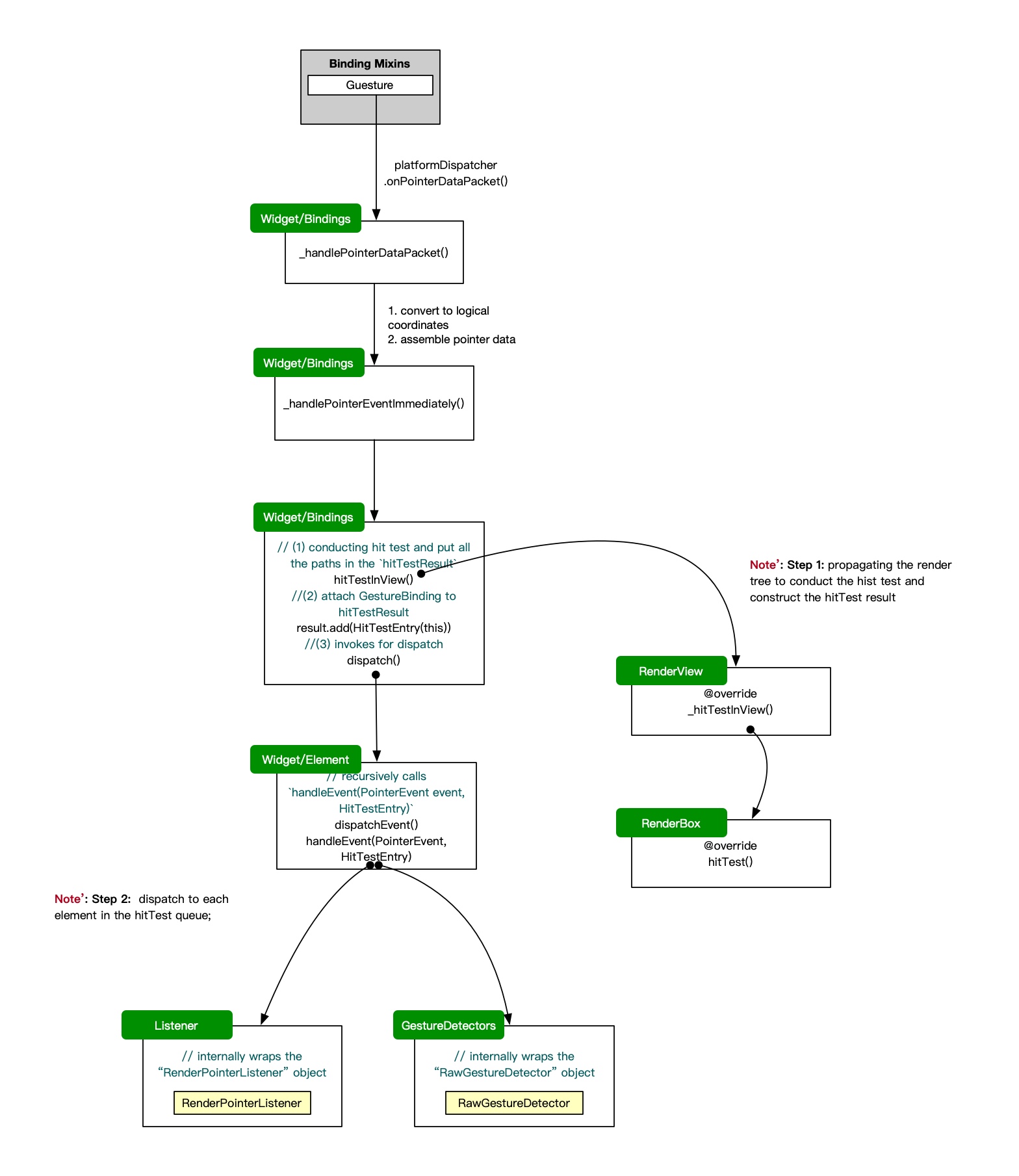
The Overall Flow
When a user interacts with the screen, the following sequence of events occurs:
- The PlatformDispatcher receives raw pointer events from the underlying platform (e.g., touch events on mobile devices or mouse events on desktop). and calls
onPointerDataPacketto deliver the pointer data to the Flutter framework. - The
GestureBindingprocesses the data and convert the physical coordinates to logical coordinates based on the device pixel ratio, further assembles the data intoPointerEventobjects. - Further the
GestureBindinginvokes the functionvoid _handlePointerEventImmediately(PointerEvent event), inside which several important steps happen:- First, it calls
hitTestto perform a hit test on the widget tree to determine which widgets are under the pointer event’s location. The hit test result is stored in aHitTestResultobject. - Then it add itself to the end of the hitTestResult path to ensure that it can receive all pointer events.
- Finally, it dispatches the
PointerEventto the widgets that were hit during the hit test by callingdispatchEvent.
- First, it calls
  void _handlePointerEventImmediately(PointerEvent event) {
    HitTestResult? hitTestResult;
    if (event is PointerDownEvent ||
        event is PointerSignalEvent ||
        event is PointerHoverEvent ||
        event is PointerPanZoomStartEvent) {
      hitTestResult = HitTestResult();
      /// constructing hitTestResult via invoking hitTest chain in RenderBox tree
      hitTestInView(hitTestResult, event.position, event.viewId);
    }
    if (hitTestResult != null || event is PointerAddedEvent || event is PointerRemovedEvent) {
      /// invokes dispatchEvent to deliver the event to relevant widgets
      dispatchEvent(event, hitTestResult);
    }
  }
The dispatchEvent method iterates through the HitTestResult and delivers the PointerEvent to each widget that was hit. Widgets can then handle the event as needed, such as updating their state or triggering animations.
  void dispatchEvent(PointerEvent event, HitTestResult? hitTestResult) {
    if (hitTestResult != null) {
      for (final HitTestEntry entry in hitTestResult.path) {
        entry.target.handleEvent(event, entry);
      }
    }
  }
In this article, Listener and GestureDetector are used further discussed to illustrate how widgets handle pointer events.
Listener
The listener widget is a stateless widget which internally wraps the RenderPointerListener, which receives the pointer events dispatched from the GestureBinding and further calls the corresponding callback functions based on the type of pointer event.
class RenderPointerListener extends RenderProxyBoxWithHitTestBehavior {
  @override
  void handleEvent(PointerEvent event, HitTestEntry entry) {
    assert(debugHandleEvent(event, entry));
    return switch (event) {
      PointerDownEvent() => onPointerDown?.call(event),
      PointerMoveEvent() => onPointerMove?.call(event),
      PointerUpEvent() => onPointerUp?.call(event),
      PointerHoverEvent() => onPointerHover?.call(event),
      PointerCancelEvent() => onPointerCancel?.call(event),
      PointerPanZoomStartEvent() => onPointerPanZoomStart?.call(event),
      PointerPanZoomUpdateEvent() => onPointerPanZoomUpdate?.call(event),
      PointerPanZoomEndEvent() => onPointerPanZoomEnd?.call(event),
      PointerSignalEvent() => onPointerSignal?.call(event),
      _ => null,
    };
  }
}
Simple and straightforward right? The listener widget just listens to all pointer events and calls the corresponding callback functions, which means:
- The same pointer event can be listened by multiple listener widgets at the same time.
- The child widget always receives the pointer event first before the parent widget.
GestureDetector
Compared to the listener widget, the gesture detector widget is more complex. It is also a stateless widget which internally wraps the RawGestureDetector, which uses multiple gesture recognizers to recognize different gestures based on the pointer events dispatched from the GestureBinding.
- During the
buildphase, the GestureDetector creates a gesture map to map different gesture recognizers to their corresponding callback functions and based on the type of callbacks, it creates the corresponding gesture recognizers.
@override
Widget build(BuildContext context) {
  final Map<Type, GestureRecognizerFactory> gestures = <Type, GestureRecognizerFactory>{};
  final DeviceGestureSettings? gestureSettings = MediaQuery.maybeGestureSettingsOf(context);
  final ScrollBehavior configuration = ScrollConfiguration.of(context);
  if (onTapDown != null ||
      onTapUp != null ||
      onTap != null ||
      onTapCancel != null ||
      onSecondaryTap != null ||
      onSecondaryTapDown != null ||
      onSecondaryTapUp != null ||
      onSecondaryTapCancel != null ||
      onTertiaryTapDown != null ||
      onTertiaryTapUp != null ||
      onTertiaryTapCancel != null) {
    gestures[TapGestureRecognizer] = GestureRecognizerFactoryWithHandlers<TapGestureRecognizer>(
      () => TapGestureRecognizer(debugOwner: this, supportedDevices: supportedDevices),
      (TapGestureRecognizer instance) {
        instance
          ..onTapDown = onTapDown
          ..onTapUp = onTapUp
          ..onTap = onTap
          ..onTapCancel = onTapCancel
          ..onSecondaryTap = onSecondaryTap
          ..onSecondaryTapDown = onSecondaryTapDown
          ..onSecondaryTapUp = onSecondaryTapUp
          ..onSecondaryTapCancel = onSecondaryTapCancel
          ..onTertiaryTapDown = onTertiaryTapDown
          ..onTertiaryTapUp = onTertiaryTapUp
          ..onTertiaryTapCancel = onTertiaryTapCancel
          ..gestureSettings = gestureSettings
          ..supportedDevices = supportedDevices;
      },
    );
  }

  // ...
  return RawGestureDetector(
    gestures: gestures,
    behavior: behavior,
    excludeFromSemantics: excludeFromSemantics,
    child: child,
  );
}
- In the
RawGestureDetector, when adown pointerevent is dispatched, it callsaddAllowedPointerand further invokesstartTrackingPointeron the base Recognizer class to start tracking the pointer event.
@protected
void startTrackingPointer(int pointer, [Matrix4? transform]) {
  /// register the pointer to GestureBinding's pointerRouter
  GestureBinding.instance.pointerRouter.addRoute(pointer, handleEvent, transform);
  _trackedPointers.add(pointer);
  /// pointer added to arena
  _entries[pointer] = _addPointerToArena(pointer);
}
- Right after the step above, the
GuestBinding(added in the end of the hitTestResult path) receives the pointer event first and callshandleEventfor further redirecting the event to theGestureBinding.instance.pointerRouter, the router will call those gesture recognizers’handleEventmethod to process the event.
mixin GestureBinding on BindingBase implements HitTestable, HitTestDispatcher, HitTestTarget {
  @override // from HitTestTarget
  void handleEvent(PointerEvent event, HitTestEntry entry) {
    pointerRouter.route(event);
    if (event is PointerDownEvent || event is PointerPanZoomStartEvent) {
      gestureArena.close(event.pointer);
    } else if (event is PointerUpEvent || event is PointerPanZoomEndEvent) {
      gestureArena.sweep(event.pointer);
    } else if (event is PointerSignalEvent) {
      pointerSignalResolver.resolve(event);
    }
  }
}
Resolving of gesture conflict:
Still in the previous code snippet, ` _entries[pointer] = _addPointerToArena(pointer);` add the pointer to the gesture arena, which organizes all gesture recognizers that are interested in the same pointer into a area:
class _GestureArena {
  final List<GestureArenaMember> members = <GestureArenaMember>[];
  bool isOpen = true;
  bool isHeld = false;
  bool hasPendingSweep = false;

  /// If a member attempts to win while the arena is still open, it becomes the
  /// "eager winner". We look for an eager winner when closing the arena to new
  /// participants, and if there is one, we resolve the arena in its favor at
  /// that time.
  GestureArenaMember? eagerWinner;

  void add(GestureArenaMember member) {
    assert(isOpen);
    members.add(member);
  }
}

class GestureArenaManager {
  final Map<int, _GestureArena> _arenas = <int, _GestureArena>{};

  /// Adds a new member (e.g., gesture recognizer) to the arena.
  GestureArenaEntry add(int pointer, GestureArenaMember member) {
    final _GestureArena state = _arenas.putIfAbsent(pointer, () {
      return _GestureArena();
    });
    state.add(member);
    return GestureArenaEntry._(this, pointer, member);
  }
}
At the end of a PointDown event, the arena is closed by calling gestureArena.close(event.pointer);, during which if there is an eager winner, the arena is resolved in its favor immediately. Otherwise, the arena remains open until one of the members claims victory.
When a member wants to claim victory, it calls resolve method on its GestureArenaEntry, which further calls _resolve method on the GestureArenaManager to resolve the arena.
Compared to the previous lengthy code analysis on flutter rendering and layout, the gesture system in Flutter is relatively straightforward and easy to understand. The use of hit testing and gesture recognizers allows for a flexible and extensible way to handle user input, making it easy to create complex interactions in Flutter applications.