Flutter Project Structure Template
By the time a Flutter project reaches its mid-to-late stage, the thing most likely to rot isn’t any single piece of code — it’s the question of where things belong. Network calls creep into pages, widgets reach for global singletons, service files sprout branching business logic. Each spot makes sense on its own; taken together, a new hire will be lost by the end of week one.
This post is my first-draft template for a Flutter project structure that has been holding up well recently: from the top-level directory layout, down to the layering inside lib/, down to the writing conventions for a single page. The goal is not “the best architecture” — it’s a skeleton where every file has an obvious home, and every change has an obvious landing spot.
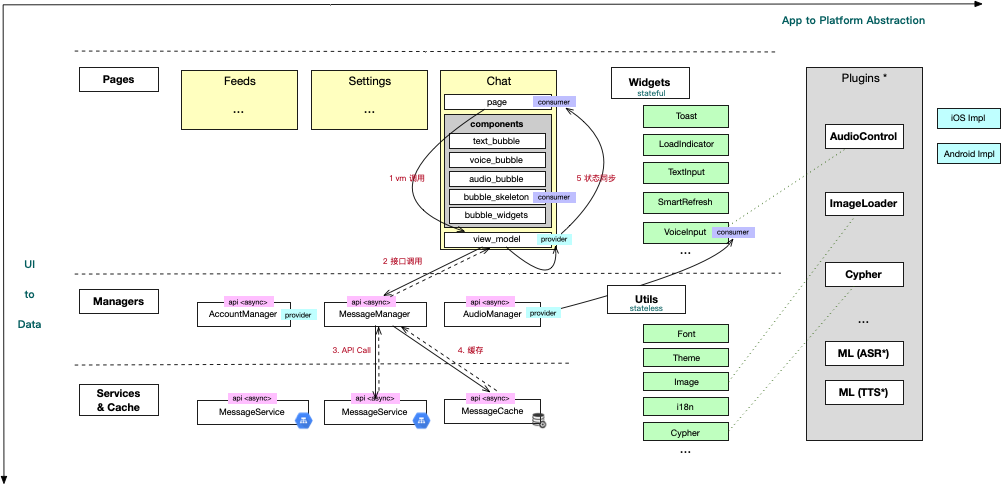
Glossary
- Page: an interaction-visual unit, typically corresponding to a navigable route destination, e.g.
ChatPage,FeedsPage - View Model: the state-orchestration layer that belongs exclusively to the current page, exposing signals via Riverpod Providers
- Manager: the global, cross-page data management layer; serves view_models upward, orchestrates services and cache downward
- Service: the thinnest possible layer sitting on top of the backend REST/RPC — request-and-deserialize only, no business decisions
- Cache: the local persistence layer, spanning three media: file, preference, and DB
- Widget (in this post’s context): the reusable UI component layer; it doesn’t conflict with the Flutter framework’s
Widgetconcept, but here refers specifically to reusable components under this project’swidgets/directory - Utils: the non-UI pure toolbox — i18n, image enums, theme constants, etc.
Top-Level Project Structure
Looking at the Flutter project root, there are only five top-level directories, each with a clear and non-overlapping responsibility:
| Directory | Responsibility |
|---|---|
lib/ |
The Flutter main project path — all Dart source code |
assets/ |
Static resources: i18n strings, default configs, images, fonts — bundled into the install package at build time |
android/ |
The Android host project. Internal plugins live here; native Android dependencies come in via Gradle |
ios/ |
The iOS host project. Internal plugins live here; native iOS dependencies come in via CocoaPods |
build/ |
Build artifacts, .gitignored |
android/ and ios/ are Flutter’s natural dual-platform shells. These two directories are where platform difference lives; the vast majority of directories under lib/ should be completely platform-agnostic — a principle that runs through the entire layering discussion below.
Layering Inside lib/
Under lib/, files are split into flat directories by responsibility. Each directory owns exactly one layer of responsibility, and cross-layer calls flow in a defined direction.
Two guiding axes:
- Vertical: UI ↕ Business ↕ Data — calls flow one-way, downward
- Horizontal: from cross-platform Flutter code out to platform-specific integrations (Platform Agnostic → Platform Specific)
pages/
The pages directory is split into subdirectories by feature, e.g. pages/chat/, pages/intro/, pages/feeds/. Each page folder contains three fixed things:
page.dart: the page’s Widget itselfview_model.dart: the page’s VM, aggregating all Riverpod Providers this page needs to registercomponents/: complex sub-components that are private to this page. They may register Providers from the current page’s VM, or Providers from global managers
Pages can be composed into higher-granularity pages (for instance, a tab container that combines ChatPage / FeedsPage / SettingsPage). Composition is allowed, but the composite itself still lives under pages/.
managers/
Managers form the global, page-agnostic data management layer — the middle layer between view_models and models/services/cache.
- Public interface: exposed to other managers, or to each page’s view_model
- Interior: orchestrates remote calls through
services/and internal state sync throughcache/ - State exits: provides global state via Providers — e.g. “current audio playback state”, “user login state”
The manager is where “a business action” is smoothed out into “a data source”. Upper layers don’t need to know that sending a message simultaneously involves an API call, a local cache write, and a state broadcast — all of that orchestration is contained inside the manager.
models/
Pure business entity definitions: Message, Feed, Account, and other entities. No logic, no platform awareness, no UI dependencies.
services/
The thinnest possible layer over the backend interface:
constvalues define API domain names- One service file per domain, e.g.
message_service.dart/feed_service.dart
Inside a service: fire the request, deserialize the response, propagate errors. Business decisions are left to the manager.
cache/
The local cache layer, split by medium:
- File: file-based caching
- Preference: KV storage for preference-style data
- DB: structured data repositories, e.g.
message_repo/feeds_repo
The three media are peers — each encapsulates its own read/write path — and the caller (typically a manager) picks based on data shape.
widgets/
The UI toolbox — reusable components shared across pages: Toast, LoadIndicator, TextInput, SmartRefresh, VoiceInput, …
Two constraints on widgets here:
- They may subscribe to state sources in global managers (this is the key distinction from page-private
components/) - State coming from the integrating page enters as props + callbacks — do not hide integrator state inside a widget-level singleton
utils/
The non-UI pure toolbox: i18n, device info, image enums (AppImage), UI theme system constants, font constants, crypto utilities, …
The boundary between utils/ and widgets/ is “does it emit UI?” — anything that emits UI goes to widgets/, everything else goes to utils/.
plugins/
The plugin layer that the toolbox layer plugs into, bridging platform-native capabilities. In most projects this starts as a placeholder directory and fills in over time: AudioControl, ImageLoader, crypto modules, TTS (Text-To-Speech), ASR (Automatic Speech Recognition), and so on. Plugin modules can be pulled into the project as git submodules.
Cross-Layer Call Flow
Wiring the layers together with a canonical “send a message → render the bubble” flow:
(text_bubble) participant VM as ChatPage.view_model participant Mgr as MessageManager participant Svc as MessageService participant Db as MessageCache Page->>VM: 1. UI event invocation VM->>Mgr: 2. Interface call Mgr->>Svc: 3. API Call Svc-->>Mgr: 3'. Response Mgr->>Db: 4. Cache write Mgr-->>VM: 5. State sync (Provider) VM-->>Page: 5'. Consumes new state
The key rule: the Page layer never bypasses the VM to call a Service directly, and the Service layer never knows who upstream of the Manager is using it. Every cross-layer call is a single step downward — no skipping levels.
Page Template Convention
How to write a single page file needs its own template too — otherwise every developer grows their own habits. Here is the skeleton for a Home page; the Roots page in the reference repository is a working example.
Writing conventions:
- The
StatefulWidgetitself carries only immutable properties (finalfields), with a simple constructor - Inside
_HomeState, declare in a fixed order:- Style constants: while a project-wide theme system is not yet in place, keep colors and sizes as constants at the top of the page; once the theme system lands, migrate them out to the global theme
- Page state and private methods: state variables like
_selectedIndex, private methods like_selectPage/_onTap(leading underscore = private) - The
buildmethod: composition only
- If a “structurally complex sub-component” shows up inside
build, move it into this page’scomponents/—buildshould stay readable in one glance
Easy-to-Miss Constraints
- Platform awareness: only
widgets/,utils/, andplugins/are allowed to be “platform-aware” (since they may bridge Method Channels or native dependencies);pages//managers//models//services//cache/must all be platform-agnostic - Provider ownership: page-level Providers are defined and registered in
pages/<page>/view_model.dart; global Providers live undermanagers/ - The
components/boundary: the moment a component is used by more than one page, it must be promoted towidgets/—components/is reserved for page-private implementations - No shortcuts: pages importing services or caches directly is the most common bad shortcut, and it hollows out the manager layer. In code review, look for these level-skipping calls first
Wrap
This structure is not the only answer, but it gives clear answers to three questions:
- Where does a new file belong? — map it to a directory by responsibility; boundaries are explicit
- What does a new page look like? — start with the
page.dart+view_model.dart+components/trio - Where does data flow from and to? — a one-way pipeline: UI ↔ VM ↔ Manager ↔ Service/Cache
That’s the first draft. Concrete pitfalls encountered during rollout — cross-page Provider lifecycles, cache consistency strategies, multi-manager orchestration — deserve their own follow-up posts.