Building a NestJS Template for EKS
A clear project structure lets developers ship new features quickly and keep maintenance costs low. In the past month, I have been working on a prototype project that involves building a NestJS application and deploying it to Amazon EKS. This post helps me summarize the ideal project structure which I explored so far, which I hope can be reused in future projects.
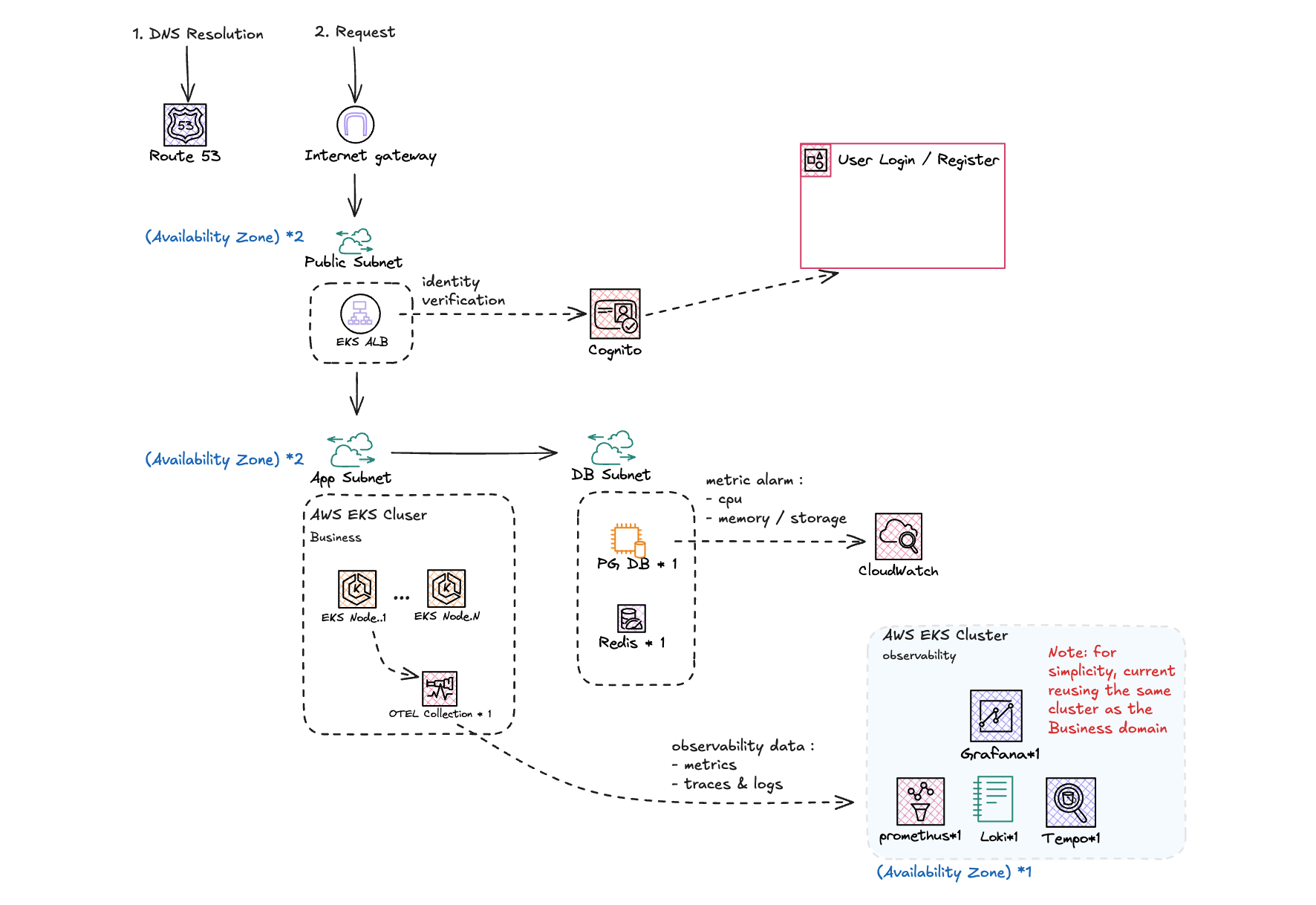
1. The Project Structure:
src/
├── modules/            # Feature modules (business)
│   ├── users/          # Controller / service / repository (PG) / cache (Redis)
│   ├── identity/       # ALB JWT verification, @Public() / @Roles(), authorization guards
│   ├── audit/          # Audit events
│   └── health/         # /health/live, /health/ready
└── common/             # Cross-cutting infrastructure
    ├── config/         # Env vars + *_FILE secrets, validated once at startup
    ├── db/             # Single PG pool / Redis client, transactions, lifecycle
    ├── http/           # Unified response envelope, exception filter, interceptor
    ├── codes/          # Result codes + HTTP status mapping
    ├── lifecycle/      # Graceful shutdown on SIGTERM (drain + coordinator)
    ├── observability/  # Prometheus metrics, OpenTelemetry traces & logs
    ├── swagger/        # OpenAPI description, result-code table
    ├── context/        # AsyncLocalStorage request context
    ├── language/       # API messages
    └── utils/          # JSON logger, timeout helpers
The src directory contains two main folders: modules and common:
- The
modulesfolder contains the feature modules of the application, each contains its own data entity, repository (also includes ), service, and controller. Let’s using theusersas an example:
├── dto                 # request / response DTOs
├── user.cache.ts       # redis cache
├── user.exceptions.ts  # custom exceptions, error codes
├── user.model.ts       # user entity
├── user.repository.ts  # pg db repository
├── users.controller.ts
├── users.module.ts
└── users.service.ts
- The
commonfolder contains cross-cutting infrastructure that can be reused across modules, such as database connection, HTTP response envelope, exception filter, observability, and so on. Overall there are two types of them:- common none-controller modules, providing interceptors, guards and middlewares. such as
db,http,lifecycleandutils. - type enumerations, constants or those only need to run once at startup, such as
codes,config,languageandswagger.
- common none-controller modules, providing interceptors, guards and middlewares. such as
2. Data Flow Convention:
2.1 Initialization
Make the initialization of the application simple and clear. The main.ts file should only focus on the following tasks:
- Create the NestJS application instance.
- Load the configuration and validate the environment variables.
- Listen to the port and start the application.
Rest of the initialization such as database connection, redis cache connection should be delegated to the relevant modules, which will be loaded and initialized by the NestJS framework:
export const redisProvider: FactoryProvider<Redis> = {
	provide: REDIS_CLIENT,
	inject: [ConfigService, AppLogger],
	useFactory: (config: ConfigService, log: AppLogger): Redis =>
		createRedisClient(requireAppConfig(config).redis, log),
};

// which can be register in the module:
@Module({
	providers: [
		pgPoolProvider,
		redisProvider,
		TransactionRunner,
		DatabaseLifecycle,
	],
	exports: [PG_POOL, REDIS_CLIENT, TransactionRunner, DatabaseLifecycle],
})
export class DatabaseModule {}
2.2 Dependency Direction
- The modules in
commonfolder:- should not depend nor sense the existence of
modules. - should not depend on each other, and should be able to run independently.
- should not depend nor sense the existence of
- The modules in
modulesfolder:- can access the interceptors, guards and middlewares provided by
commonmodules via@Inject() - can access the services provided by other modules via
@Inject().
- can access the interceptors, guards and middlewares provided by
2.3 Inter Module Communication
Please note that each module holds the definition of its own data entity and dto. Each module can communicate with other modules via service injection. Usually the service layer will finish the data entity composition across modules and return the unified dto to the controller. The controller will then return the dto to the client:
                 Client
                  │  ▲
         request  │  │  response
                  ▼  │
┌─ Module A ────────────────────────────┐      ┌─ Module B ───────────────────────┐
│                                       │      │                                  │
│           ┌──────────────┐            │      │                                  │
│           │ Controller A │            │      │                                  │
│           └──────────────┘            │      │                                  │
│                 │  ▲                  │      │                                  │
│      (1) params │  │ (6) unified DTO  │      │                                  │
│                 ▼  │                  │      │                                  │
│           ┌──────────────┐   (3) call │      │      ┌──────────────┐            │
│           │  Service A   │────────────┼──────┼─────▶│  Service B   │            │
│           │              │◀───────────┼──────┼──────│              │            │
│           └──────────────┘ (5) entity │      │      └──────────────┘            │
│                 │  ▲                  │      │            │  ▲                  │
│             (2) ▼  │                  │      │        (4) ▼  │                  │
│   ┌──────────────────────────────┐    │      │   ┌────────────────────────────┐ │
│   │ repository / cache / model   │    │      │   │ repository / cache / model │ │
│   └──────────────────────────────┘    │      │   └────────────────────────────┘ │
│                                       │      │                                  │
└───────────────────────────────────────┘      └──────────────────────────────────┘
- Controller A validates the request and passes the params to Service A.
- Service A runs its own module’s business code (repository / cache / model).
- Service A calls Service B, which is injected from Module B.
- Service B runs its own module’s business code.
- Service B returns its entity to Service A.
- Service A composes the entities into a unified DTO and returns it to Controller A, which responds to the client.
2.4 The Response Envelope
Every response — success or failure — is wrapped in the same JSON envelope. The design follows two rules:
- Respect HTTP status codes. The envelope never hides the real status behind a
200. A missing user is a404, a duplicate email is a409, an unavailable database is a503. Load balancers, retries, metrics and client libraries all keep working as expected. - Always return a complete payload. Besides the status, the body carries a stable business
code, a human-readablemessage, optionaldetailsand acorrelationId, so the client knows exactly what went wrong and can quote the id when reporting it.
export type ApiResponse<T> = {
	code: number; // 0 = success, 1xxx = platform errors, 2xxx = business errors
	message: string;
	data: T | null; // null on errors
	details?: unknown; // only for codes that allow it (e.g. validation errors)
	correlationId: string; // same value as the x-lifecycle-id response header
};
For example, creating a user with an email that already exists:
HTTP/1.1 409 Conflict

{
	"code": 2002,
	"message": "Email already registered",
	"data": null,
	"details": { "email": "jane@example.com" },
	"correlationId": "6f1c2a9e-0b4d-4f7e-9a51-3c2d8e7b1f40"
}
Each result code is registered once in common/codes/result-code.registry.ts, together with its HTTP status and whether message / details may be exposed to the client. Business exceptions only need to carry a code, and the registry decides the rest.
The envelope is applied in three places, and controllers never build it by hand:
| # | Where | When | Builds |
|---|---|---|---|
| ① | common/lifecycle/lifecycle.hook.ts (Fastify onRequest) |
The instance is draining on SIGTERM; rejects the request before it reaches Nest | errorEnvelope(SERVICE_DRAINING) with 503 + retry-after |
| ② | common/http/envelope.interceptor.ts (global interceptor) |
The handler returns normally | successEnvelope(data) with 200 |
| ③ | common/http/envelope-exception.filter.ts (global filter) |
Anything throws: guards, ValidationPipe, controllers, services, or an unmatched route |
errorEnvelope(code) with the real 4xx / 5xx status |
Client ── request ──▶ Fastify onRequest (lifecycle hook)
                        │
                        ├── draining ──▶ ① errorEnvelope(1007) ──▶ 503
                        ▼
                      Guards (identity / roles) ───┐
                        │                          │
                      EnvelopeInterceptor (pre)    │
                        │                          │
                      ValidationPipe ──────────────┤
                        │                          │ throw
                      Controller ──▶ Service ──────┤
                        │                          │
                        │ return data              │ (also unmatched routes)
                        ▼                          ▼
              ② EnvelopeInterceptor        ③ EnvelopeExceptionFilter
                 successEnvelope(data)        errorEnvelope(code)
                        │                          │
                        ▼                          ▼
                 200 { code: 0 }            4xx / 5xx { code: 1xxx / 2xxx }
The exception filter (③) normalizes every error into a status and a code:
EnvelopeException(business errors) → status and code from the registry.- Nest
HttpException(e.g. fromValidationPipeorParseUUIDPipe) → keeps its own status, the code is mapped from it (400→1001,404→1004, …). - PostgreSQL / Redis being unreachable, overloaded or timing out →
503withDEPENDENCY_UNAVAILABLE, instead of a misleading500. - Anything else →
500withUNKNOWN.
Edge Case:
- Endpoints that must return a raw body, such as the Kubernetes probes
/health/liveand/health/ready, opt out with@SkipEnvelope().
3. EKS Deployment Support:
3.1 Probes
The service exposes two probe endpoints on the API port (3030). Both are @Public() and @SkipEnvelope(), so they skip authentication and return a raw body:
| Endpoint | Question it answers | Checks | Used by |
|---|---|---|---|
/health/live |
Is the process alive? | Nothing external, always 200 |
kubelet startupProbe / livenessProbe |
/health/ready |
Can this pod serve traffic now? | Draining state, PostgreSQL, Redis | kubelet readinessProbe, ALB target group health check |
The readiness probe decides whether the pod stays in the Service endpoints and the ALB target group, note there when redis is down, the probe still returns ``200` because the cache fails open. The following table summarizes the possible situations and the corresponding response:
| Situation | Status | Body |
|---|---|---|
| PostgreSQL and Redis up | 200 |
{ "status": "ok", "checks": { ... } } |
| Redis down (the cache fails open) | 200 |
{ "status": "degraded", "checks": { ... } } |
| PostgreSQL down | 503 |
{ "status": "unavailable", "checks": { ... } } |
| SIGTERM received | 503 |
{ "status": "draining" } |
Note: in production environment, we may consider to treat the redis down as a 503 as well. Since it may cause the overload of database and degrade the service performance.
Each dependency check is bounded (500 ms to acquire a connection + 500 ms for the query), so the endpoint always answers within the probe’s 2 s timeout. Concurrent probes from kubelet and the ALB share one in-flight check. On the Kubernetes side:
startupProbe: # up to 30 x 5s = 150s for the app to boot
  httpGet: { path: /health/live, port: http }
  failureThreshold: 30
  periodSeconds: 5
livenessProbe:
  httpGet: { path: /health/live, port: http }
  periodSeconds: 10
  timeoutSeconds: 2
readinessProbe:
  httpGet: { path: /health/ready, port: http }
  periodSeconds: 5
  timeoutSeconds: 2
And the ALB Ingress points its health check at the same readiness endpoint:
"alb.ingress.kubernetes.io/healthcheck-path" = "/health/ready"
"alb.ingress.kubernetes.io/healthcheck-port" = "3030"
Because readiness turns 503 as soon as SIGTERM arrives, the pod is removed from the ALB before it stops accepting requests, which is the first step of graceful shutdown.
3.2 Observability
Each signal takes the transport that suits it best (dashed: the optional OTLP log path):
┌─ Pod: primaris-api ───────────────────────┐
│                                           │
│  OTel SDK ─── traces (OTLP/HTTP) ─────────┼──▶ OTel Collector ──▶ Tempo
│                                           │       ▲        ╎
│    ┌╌ logs (OTLP/HTTP), alternative ╌╌╌╌╌╌┼╌╌╌╌╌╌╌┘        ╎
│    ╎                                      │                ▼
│  AppLogger ── JSON lines ──▶ stdout ──────┼──▶ Alloy ───────────▶ Loki
│                                           │
│  MetricsServer  :9464/metrics ◀───────────┼─── Prometheus (scrape every 15s)
│                                           │
└───────────────────────────────────────────┘
Grafana is the single UI on top: Prometheus for metrics, Loki for logs, and Tempo for traces (Explore with TraceQL, or Drilldown → Traces).
- Traces (push): The OTel SDK starts at the very top of
app.module.ts, before Nest, Fastify,pgandioredisload, so all of them are auto-instrumented. Spans are batched and pushed to the Collector, which forwards them to Tempo over OTLP. The app only speaks OTLP to the Collector, so swapping the trace backend (it was Jaeger before) needed no change in the app. - Logs: stdout by default
AppLoggerwrites one JSON line per entry to stdout, and Alloy ships pod logs to Loki. Logs survive a Collector outage, andkubectl logskeeps working.- The sink is configurable: once
OTEL_EXPORTER_OTLP_LOGS_ENDPOINTis set, the same entries are exported as OTel LogRecords to the Collector instead, which then needs a logs pipeline to Loki.
- Metrics (pull):
MetricsServerserves/metricson a separate port, and Prometheus scrapes it through aServiceMonitor. Counting happens in a FastifyonResponsehook, so every request is counted, unlike traces, which are sampled.- OTel metrics are switched off on purpose with
metricReaders: []in theNodeSDKoptions. Leaving the option out is not the same: the SDK then readsOTEL_METRICS_EXPORTER, which defaults tootlp, and keeps pushing tolocalhost:4318. An empty array means noMeterProvideris created at all.
- OTel metrics are switched off on purpose with
- Correlation: Every log line carries
trace_id/span_idplus the sameservice/releaseas the trace resource. In Grafana, a Loki derived field turnstrace_idinto a link to Tempo, and a span links back to its logs throughservice.name → appandk8s.namespace.name → namespace. - Failure isolation: Trace export is async and bounded. An unreachable Collector only drops spans, and never blocks a request.